Beatsaber Multiplayer with Mods: Difference between revisions
From MondoCat.TV Wiki - Welcome Nerds!
No edit summary |
No edit summary |
||
| Line 36: | Line 36: | ||
== Recommended mods == | == Recommended mods == | ||
BetterSongSearch* | * BetterSongSearch* | ||
Camera2 (third person camera in the desktop window, useful for streaming) | * Camera2 (third person camera in the desktop window, useful for streaming) | ||
Custom Avatars* (Import your model into Beat Saber, primarily useful in conjunction with Camera2) | * Custom Avatars* (Import your model into Beat Saber, primarily useful in conjunction with Camera2) | ||
<nowiki>*</nowiki> See [[importing your avatar]] (coming soon!) | <nowiki>*</nowiki> See [[importing your avatar]] (coming soon!) | ||
Revision as of 01:37, 12 April 2023
Current version
We are currently using Beat Saber 1.28.0
Setup guide
| PLEASE NOTE: These instructions require you own the game on steam. It is possible to downgrade beat saber and run via the oculus store/app, but that is not covered in this guide. |
Prerequisites
Beat Saber Legacy Launcher - Click utilities at the top, and download BSLegacyLauncher
Beat Saber Mod Assistant - Download ModAssistant.exe
Setup instructions
- Extract BSLegacyLauncher somewhere it'll live permanently.
- For convenience, move ModAssistant.exe to the same folder
- Open up "Beat Saber Legacy Launcher.exe". It may be in a folder called BSLegacyLauncher. It should look something like below.
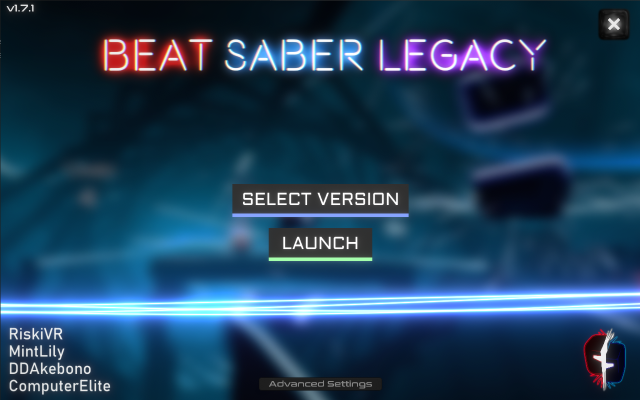
- Choose "Select Version", select the year along the top, select the version number in the middle, and hit download. See Beatsaber Multiplayer with Mods#Current version.


Mods
Required Mods
- BeatTogether
- Chroma
- MappingExtensions
- NoodleExtensions
- BSIPA*
- BeatSaberMarkupLanguage*
- SongCore*
- BeatSaverSharp*
- SiraUtil*
- MultiplayerCore*
*If using the Beat Saber mod assistant, this mod will be selected automatically when selecting the other mods.
Recommended mods
- BetterSongSearch*
- Camera2 (third person camera in the desktop window, useful for streaming)
- Custom Avatars* (Import your model into Beat Saber, primarily useful in conjunction with Camera2)
* See importing your avatar (coming soon!)

