Beatsaber Multiplayer with Mods: Difference between revisions
From MondoCat.TV Wiki - Welcome Nerds!
No edit summary |
(Add directions for pointing mod assistant to the correct folder.) |
||
| Line 18: | Line 18: | ||
# Open up "Beat Saber Legacy Launcher.exe". It may be in a folder called BSLegacyLauncher. It should look something like below. [[image:BSLegacyLauncher Main Page.png | 640px]] | # Open up "Beat Saber Legacy Launcher.exe". It may be in a folder called BSLegacyLauncher. It should look something like below. [[image:BSLegacyLauncher Main Page.png | 640px]] | ||
# Choose "Select Version", select the year along the top, select the version number in the middle, and hit download. See [[Beatsaber Multiplayer with Mods#Current version]]. [[image:BSLegacyLauncher Version Selection.png | 640px]] | # Choose "Select Version", select the year along the top, select the version number in the middle, and hit download. See [[Beatsaber Multiplayer with Mods#Current version]]. [[image:BSLegacyLauncher Version Selection.png | 640px]] | ||
# Enter your steam credentials, and then wait while the game downloads. | |||
# After the download is complete, back at the main menu, select "Advanced Settings" at the bottom, and then "Browse Game Files". Keep the window that comes up open, and move on to the next step. [[image:BSLegacyLauncher Advanced Settings Browse Game Files.png | 640px ]] | |||
# Open up ModAssistant.exe, and make sure to read the section completely and follow the instructions on screen. For where to get it, see [[Beatsaber Multiplayer with Mods#Prerequisites]] | |||
## Instead of going to the mods tab, instead <span style="color:#ed1c24">go to options.</span> | |||
## Under Install folder, <span style="color:#3f48cc">select "Select Folder"</span> | |||
## From the folder you pulled up from Beat Saber Legacy Launcher, <span style="color:#22b14c">click on some blank space to the right of the folder path, and copy the entire line of text that appears</span> | |||
## In the "Select your Beat Saber Install folder" window, again <span style="color:#7f7f7f">click on some space to the right of the path</span>, and paste the path you copied in the previous step. | |||
## Hit the <span style="color:#a349a4">Save button</span> towards the bottom [[image:BS Mod Manager Select Install Folder.png | 1024px | Left ]] | |||
Revision as of 21:19, 12 April 2023
Current version
We are currently using Beat Saber 1.28.0
Setup guide
| PLEASE NOTE: These instructions require you own the game on steam. It is possible to downgrade beat saber and run via the oculus store/app, but that is not covered in this guide. |
Prerequisites
Beat Saber Legacy Launcher - Click utilities at the top, and download BSLegacyLauncher
Beat Saber Mod Assistant - Download ModAssistant.exe
Setup instructions
- Extract BSLegacyLauncher somewhere it'll live permanently.
- For convenience, move ModAssistant.exe to the same folder
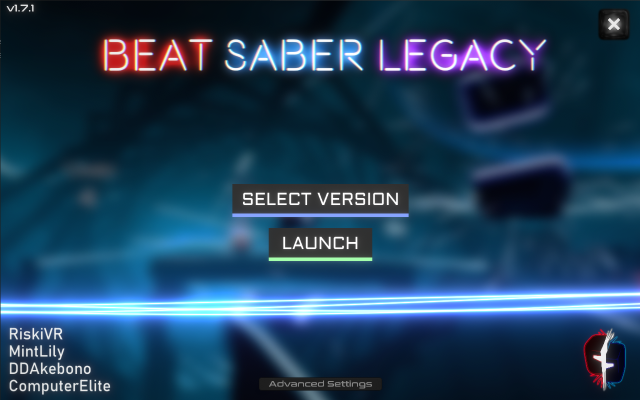
- Open up "Beat Saber Legacy Launcher.exe". It may be in a folder called BSLegacyLauncher. It should look something like below.
- Choose "Select Version", select the year along the top, select the version number in the middle, and hit download. See Beatsaber Multiplayer with Mods#Current version.

- Enter your steam credentials, and then wait while the game downloads.
- After the download is complete, back at the main menu, select "Advanced Settings" at the bottom, and then "Browse Game Files". Keep the window that comes up open, and move on to the next step.

- Open up ModAssistant.exe, and make sure to read the section completely and follow the instructions on screen. For where to get it, see Beatsaber Multiplayer with Mods#Prerequisites
- Instead of going to the mods tab, instead go to options.
- Under Install folder, select "Select Folder"
- From the folder you pulled up from Beat Saber Legacy Launcher, click on some blank space to the right of the folder path, and copy the entire line of text that appears
- In the "Select your Beat Saber Install folder" window, again click on some space to the right of the path, and paste the path you copied in the previous step.
- Hit the Save button towards the bottom


Mods
Required Mods
- BeatTogether
- Chroma
- MappingExtensions
- NoodleExtensions
- BSIPA*
- BeatSaberMarkupLanguage*
- SongCore*
- BeatSaverSharp*
- SiraUtil*
- MultiplayerCore*
*If using the Beat Saber mod assistant, this mod will be selected automatically when selecting the other mods.
Recommended mods
- BetterSongSearch*
- Camera2 (third person camera in the desktop window, useful for streaming)
- Custom Avatars* (Import your model into Beat Saber, primarily useful in conjunction with Camera2)
* See importing your avatar (coming soon!)

