Mondo's Blender Guide: Difference between revisions
From MondoCat.TV Wiki - Welcome Nerds!
| Line 15: | Line 15: | ||
=Import Your Avatar= | =Import Your Avatar= | ||
*Click the little tiny arrow with no name and no purpose for being collapsed to open the CATS tab. [[image:collapsearrow.png|thumb|200px|The tiny arrow for no reason]] | |||
Revision as of 01:47, 2 February 2023
Blender Intro
Use 2.93. Newer versions will not work.
Getting Around Blender
You dont use WASD like unity
- Rotate: Click and drag middle mouse button
- Zoom in/out: Roll middle mouse button
- Pan left/right/up/down: Shift+Click middle mouse button

Install CATS
To install Cats:
- Download the Cats.zip from github (See "Releases" at the right hand side)
- In Blender: Edit > Preferences > Add-ons > Install > Cats.zip (DONT UNZIP IT, just install it from the zip) > Make sure Cats is "Checked"
Import Your Avatar
- Click the little tiny arrow with no name and no purpose for being collapsed to open the CATS tab.
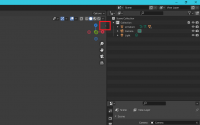
The tiny arrow for no reason


