Beatsaber Multiplayer with Mods
PSSST
- Join our BEATLEADER CLAN (Fill out #Tell-Us-Things with your profile URL!)
Prerequisites
BSManager - Used for launching modded Beat Saber
Beatsaver - Find songs you'd like to play (Easier on PC than in game sometimes!)
Current version
We are currently using Beat Saber 1.29.1.
The closed beta for 1.35.0 is currently undergoing testing. We have also participated in this testing in the past. That said, generally speaking, we're sticking with the old version until at least a public beta is announced. Keep an eye on the BeatTogetherBS twitter for announcements. https://x.com/BeatTogetherBS
Disclaimers
- Bring water, this is a game where you’ll do aerobic exercise, so remember to hydrate.
- If you need a break, to your left while in the multiplayer lobby, there’s a toggle to be an “Spectator”. Once turned on you won’t be pulled into the next map to play and you can watch.
- Clear some IRL space, some maps have obstacles that will require you to move around a little, so make sure there’s nothing you can knock at arms reach or that you can trip on.
- We will be doing songs up to expert+ difficulty with no fail mode on. Everyone will have a chance to choose a song and difficulty that works for them.
- Push yourself only to where you are comfortable. If you need to rest, please do so.
- If you just want to hang out and listen to music, feel free to just hang out!
- If you’ve got a fitness tracker, turn it in and let’s compare afterwards!
- Together as a team we will get in shape! Round is a shape, right?
Setup guide
| PLEASE NOTE: These instructions require you own the game on Steam or the Occulus Store on PC. |
- Download and install BSManager following the instructions linked in prerequisites
- If it doesn’t start automatically after install, launch BSManager from your desktop or the start menu.
- Select the current version of beat saber as specified above, and then select download.

- Follow the instructions here if you need help authenticating. https://github.com/Zagrios/bs-manager?tab=readme-ov-file#downloading-multiple-versions
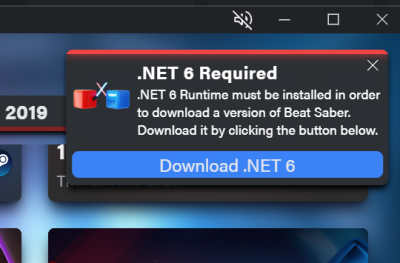
- You may get a message saying that you need to install .NET 6 runtime. Download it by clicking the button and running the installer that automaticly downloads.
- Once the beat saber version is installed, click on it on the left hand side
- Go to the mods tab, select the mods listed in the required mods list on this page, and hit “Install or Update” at the bottom right


Required mods
■ BeatTogether
■ Chroma
■ MappingExtensions
■ NoodleExtensions
Recommended Mods
■ BetterSongSearch (Helps you find songs within beat saber much easier than using the website)
■ Camera2 (third person camera in the desktop window, useful for streaming)
■ Custom Avatars (Import your Unity model into Beat Saber, primarily useful in conjunction with Camera2) - Link (Lets your friends/twitch viewers request songs)
■ Custom Notes (Changes the appearance of your notes, just remember to enable the setting to auto disable them or else some maps breaks)
■ MultiplayerExtensions (Gives you more settings more the multiplayer arena. Like the ability to use solo environments and hide other players notes, walls and platform)
Launching the Game
- Launch BSManager, which you installed by going through the instructions in the Setup Guide above. If you’re not sure, try searching your start menu for it.

- On the left, select the appropriate version of Beat Saber

- Click Launch


Errors & How To Fix Them
“This song is not owned by all players”
From what we’ve seen, this is very likely due to the song requiring certain mods, if it’s giving an error along the lines of “This song is not owned by all players”, please send us the name or link to it so we can list it here and hopefully figure out what we might be missing to be able to play it. Make sure you have all the required mods listed above.
Something just DOESNT WORK
- Make sure you are launching through BS Legacy Launcher
- Make sure Mod Assistant's options > Install Folder is pointed TOWARDS THE BS LEGACY LAUNCHER INSTALLATION FOLDER, NOT THE STEAM INSTALLATION!
- Make sure after you select the mods in Mod Assistant, click "Install"! They are NOT installed just simply by clicking them.
Required/Some Mods Not Appearing In Mod Assistant
Launching the game once (through BS Legacy Launcher!) and it should show the full list of mods in the Mod Assistant if they do not appear for you!
Song Request System (Song Request Manager)
There exists a Beat Saber Song Request Mod that enables your friends or Twitch stream viewers to send you song requests directly!
- NOTE: YOU DO NOT HAVE TO BE STREAMING FOR PEOPLE TO USE THIS!
SRM Setup Guide
|
 |
 |
Importing Your Avatar
- If you want to import your own model into BeatSaber you’ll need to download the Unity project from the next link and prepare it: BeatSaber Custom Avatars github
Thanks
Thanks to:
- Michelle for the original guide and hosting Beat Saber for many weeks! <3 <3
- Rekka for working on the original guide <3 <3
- Everyone who worked on this page <3 <3

