Mondo's Blender Guide
From MondoCat.TV Wiki - Welcome Nerds!
Blender Intro
Use 2.93. Newer versions will not work.
Getting Around Blender
You dont use WASD like unity
- Rotate: Click and drag middle mouse button
- Zoom in/out: Roll middle mouse button
- Pan left/right/up/down: Shift+Click middle mouse button

Install CATS
To install Cats:
- Download the Cats.zip from github (See "Releases" at the right hand side)
- In Blender: Edit > Preferences > Add-ons > Install > Cats.zip (DONT UNZIP IT, just install it from the zip) > Make sure Cats is "Checked"
Import Your Avatar
- Click the little tiny arrow with no name and no purpose for being collapsed to open the CATS tab.
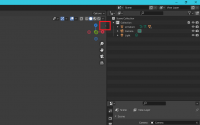
The tiny arrow for no reason - Click the cats tab.
- Click [Import Avatar] at the top
- Select [YourAvatar.fbx]
- Click the wrench next to [Fix Avatar]
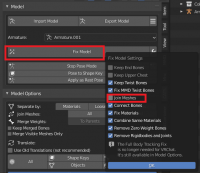
Fix Avatar Wrench Options - UNCHECK "Join Meshes". This was useful in Avatar 2.0, but is no longer. If you skip this step, you will not be able to toggle clothes because it will join the clothes meshes to your body.
- Click Fix Model. DON'T PANIC IF YOUR TEXTURES DONT SHOW UP.
- IF YOUR TEXTURES DO NOT SHOW UP: Click File > External Data > Find Missing Files > And Select the folder where your avatar is unzipped, or the folder with the textures from your model.
- IF YOUR TEXTURES STILL DO NOT SHOW UP: Please check out [MYtexturesdontshowup]


My Textures STILL Dont Show Up


