Event Masters Info
From MondoCat.TV Wiki - Welcome Nerds!
READ THIS INTRO JUNK
|
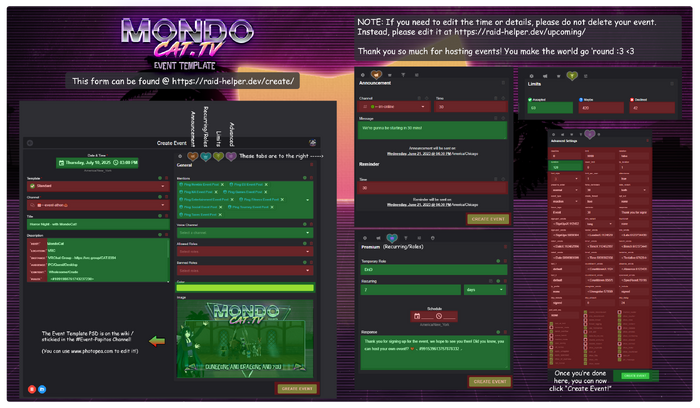
You can use either the GUI mode or the DM mode. GUI will be quicker, but you have to log into the website. DM mode can be done anywhere.
- IF YOU USE THE GUI, SET THE TIME IN YOUR OWN TIMEZONE. IF YOU USE DM MODE YOU HAVE TO USE CDT
- Make sure your red settings are the same as the picture to the right
- Green settings you can change to whatever you want
MondEvent Bot - GUI Mode
Want an easy experience? Use the GUI! (See how to use the GUI at the right)
- IF YOU USE THE GUI, SET THE TIME IN YOUR OWN TIMEZONE. IF YOU USE DM MODE YOU HAVE TO USE CDT
- Make sure your red settings are the same as the picture to the right
GUI Dashboard
https://raid-helper.dev/dashboard/
- IF YOU USE THE GUI, SET THE TIME IN YOUR OWN TIMEZONE. IF YOU USE DM MODE YOU HAVE TO USE CDT
- Make sure your orange settings are the same as the picture to the right
- Only hit delete post if you want to delete your post
|
|
MondEvent Bot - DM Mode
|
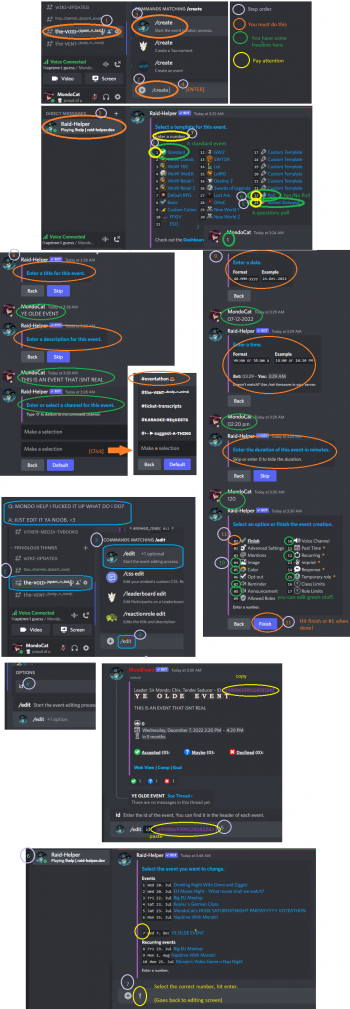
If you dont want to use the GUI, you can do it in discord. Please look at the picture at the right for more info.
- MAKE SURE the stuff at the right in ORANGE is the same as the picture.
- MAKE SURE you convert your time zone to CDT
- IF YOU USE DM MODE YOU HAVE TO USE CDT.
Normal Event
Accepted/Maybe/Declined signup with event integration, custom role tag, and more!
- /create [ENTER] - THEN IN DMS: (1)
- Follow the prompts. Make sure the options in orange are the same exact as the picture right.
- IF YOU USE DM MODE YOU HAVE TO USE CDT.
Yes/No Poll
A simple Yes/No poll with a pie chart
- /create [ENTER] - THEN IN DMS: (23)
- Follow the prompts. Make sure the options in orange are the same exact as the picture right.
- IF YOU USE DM MODE YOU HAVE TO USE CDT.
Question Poll
- /create [ENTER] - THEN IN DMS: (25)
- Sample Syntax: Do you like nachos? = Yes, No, HELL YEAH
- Follow the prompts. Make sure the options in orange are the same exact as the picture right.
- IF YOU USE DM MODE YOU HAVE TO USE CDT.
Time Converter
You must enter your time in CDT. Convert your time to CDT. https://savvytime.com/converter/cdt
|
|


